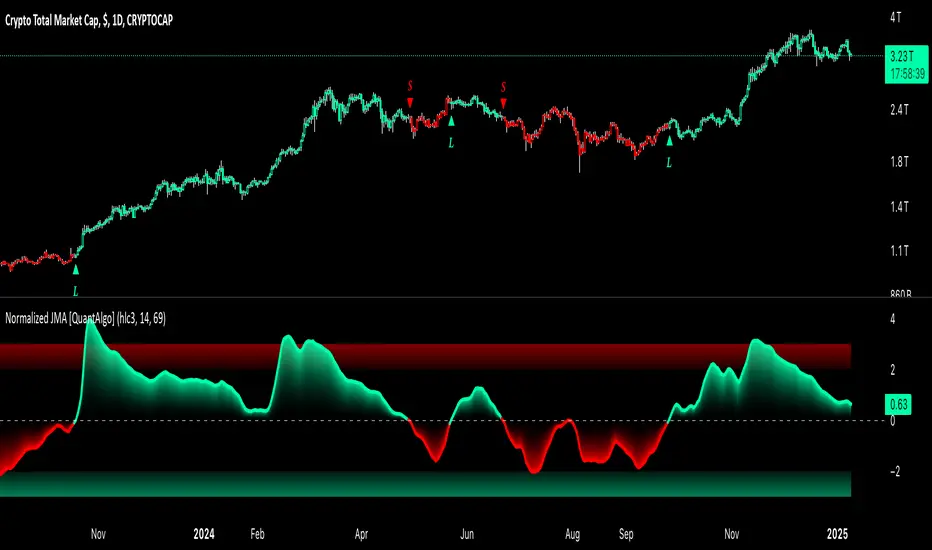
Normalized Jurik Moving Average [QuantAlgo]Upgrade your investing and trading strategy with the Normalized Jurik Moving Average (JMA) , a sophisticated oscillator that combines adaptive smoothing with statistical normalization to deliver high-quality signals! Whether you're a swing trader looking for momentum shifts or a medium- to long-term investor focusing on trend validation, this indicator's statistical approach offers valuable analytical advantages that can enhance your trading and investing decisions!
๐ข Core Architecture
The foundation of this indicator lies in its unique dual-layer calculation system. The first layer implements the Jurik Moving Average, known for its superior noise reduction and responsiveness, while the second layer applies statistical normalization (Z-Score) to create standardized readings. This sophisticated approach helps identify significant price movements while filtering out market noise across various timeframes and instruments.
๐ข Technical Foundation
Three key components power this indicator are:
Jurik Moving Average (JMA): An advanced moving average calculation that provides superior smoothing with minimal lag
Statistical Normalization: Z-Score based scaling that creates consistent, comparable readings across different market conditions
Dynamic Zone Detection: Automatically identifies overbought and oversold conditions based on statistical deviations
๐ข Key Features & Signals
The Normalized JMA delivers market insights through:
Color-adaptive oscillator line that reflects momentum strength and direction
Statistically significant overbought/oversold zones for trade validation
Smart gradient fills between signal line and zero level for enhanced visualization
Clear long (L) and short (S) markers for validated momentum shifts
Intelligent bar coloring that highlights the current market state
Customizable alert system for both bullish and bearish setups
๐ข Practical Usage Tips
Here's how to maximize your use of the Normalized JMA:
1/ Setup:
Add the indicator to your favorites, then apply it to your chart โญ๏ธ
Begin with the default smoothing period for balanced analysis
Use the default normalization period for optimal signal generation
Start with standard visualization settings
Customize colors to match your chart preferences
Enable both bar coloring and signal markers for complete visual feedback
2/ Reading Signals:
Watch for L/S markers - they indicate validated momentum shifts
Monitor oscillator line color changes for direction confirmation
Use the built-in alert system to stay informed of potential trend changes
๐ข Pro Tips
Adjust Smoothing Period based on your trading style:
โ Lower values (8-12) for more responsive signals
โ Higher values (20-30) for more stable trend identification
Fine-tune Normalization Period based on market conditions:
โ Shorter periods (20-25) for more dynamic markets
โ Longer periods (40-50) for more stable markets
Optimize your analysis by:
โ Using +2/-2 zones for primary trade signals
โ Using +3/-3 zones for extreme market conditions
โ Combining with volume analysis for trade confirmation
โ Using multiple timeframe analysis for strategic context
Combine with:
โ Volume indicators for trade validation
โ Price action for entry timing
โ Support/resistance levels for profit targets
โ Trend-following indicators for directional bias
Cari skrip untuk "volume indicator"
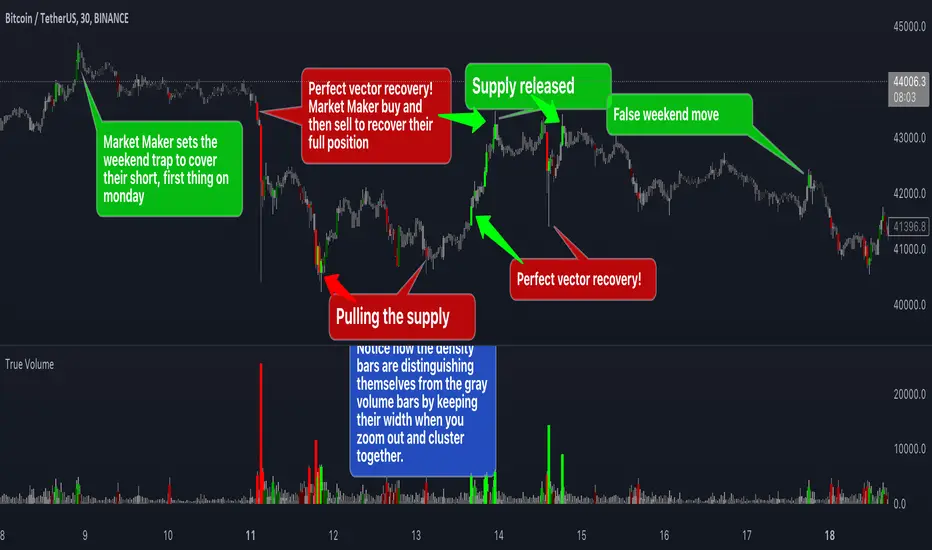
True VolumeThis indicator is designed to provide in-depth analysis of volume data from multiple sources and distinguish highly liquid candles by measuring the density of the volume. By focusing on the density and concentration of volume, rather than just the volume itself, it offers a more nuanced view of the market. This can be particularly beneficial in markets like cryptocurrencies, where understanding the role of market makers versus retail traders is crucial for strategic trading.
This is how it works:
Multiple Asset Integration:
Unlike standard volume indicators, True Volume allows the inclusion of up to four different assets (or the same asset from various exchanges) into its volume calculations. This feature provides a broader and more accurate total volume representation, essential in markets like cryptocurrencies where volume is dispersed across multiple exchanges.
Adjustable Time Anchors:
It offers various time anchor options, allowing traders to analyze volume data over different time periods or a specific amount of lookback candles. This flexibility helps in understanding volume trends over both short and long-term time frames.
Volume Density Analysis:
The core of this indicator is the innovative concept of Volume Density. It's calculated using a sigmoid function that normalizes the volume-to-price movement ratio in a unique way without needing a max cap or having the density column spike off the chart. This method helps in distinguishing between normal volume fluctuations and those that are unusually dense for the given price movement. This distinction is key in identifying potential market maker activities.
The Visuals:
The Volume Density is displayed in a unique way without compromising the original volume bars or cap the density. Infinite density can essentially be represented without having an infinitely large bar or caping out the density data. There's also two different color themes, optional bar color, and an option to flip the density bars up-side down for a different representation. Each of the original volume sources can be displayed separately as well. All colors as customizable as well for your own preference.
Price Volume Trend (PVT):
Included in this indicator is also the Price Volume Trend, which cumulatively measures the density delta, offering insights into the longer-term momentum of the market.
How do I trade it?
This indicator aims to give you insight into 'the other side of the trade', the Market Makers. When you buy, they provide liquidity by selling to you. That drives the Volume Density up.
Consider whether the market maker is currently long or short and might need to cover their position by wicking price back, or "adjust inventory". Especially towards the end of a market session.
Consider dense candles during market gaps or weekends to be market manipulation moves.
The density also goes up when stop losses are hit. If price makes a higher high or lower low, high density could indicate a liquidation event.
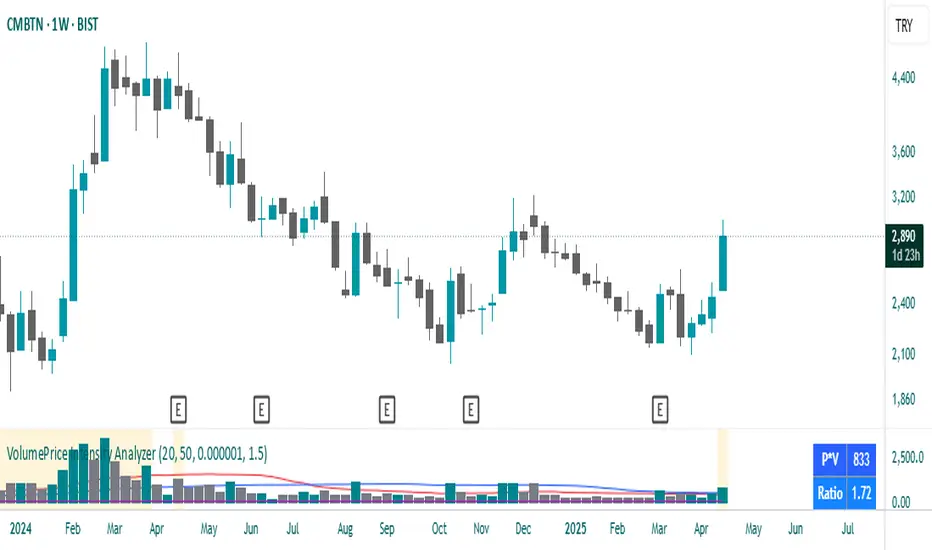
MarketSmith VolumesThe 'MarketSmith Volumes' is to be used with the 'MarketSmith Indicator' and 'EPS & Sales' in order to mimic fully MarketSmith Graphs with the maximum number of indicators allowed by a free Tradingview Plan: 3
This indicator is no more than a simple volume indicator where all parameters are already adjusted to resemble MarketSmith graphical volumes.
Also you will find integrated:
High Volumes Bars Peak :
They allow us to see peak volumes at a glance.
10-Week Average Volume :
When viewing a weekly chart, this line represents a 10-week moving average volume level. It allows you to see if the current Volume Bar of the week is above or under the average volume traded in the past 10 Weeks.
50-Day Average Volume :
When viewing a daily chart, this line represents a 50-day moving average volume level. Whether or not volume is above or below the average for a certain period could have a significant impact on your stock chart analysis.
Intraday Intensity ModesIntraday Intensity Index was created by David Bostian and its use was later featured by John Bollinger in his book "Bollinger on Bollinger Bands" . It is categorically a volume indicator and considered to be a useful tool for analyzing supply and demand dynamics in the market. By measuring the level of buying and selling pressure within a given trading session it attempts to provide insights into the strength of market participants' interest and their aggressiveness in executing trades throughout the day. It can be used in conjunction with Bollinger Bandsยฎ or other envelope type indicators as a complimentary indicator to aid in trying to identify potential turning points or trends.
Intraday intensity is calculated based upon the relationship between the price change and the volume of shares traded during each daily interval. It aims to capture the level of buying or selling activity relative to the overall volume. A high intraday intensity value suggests a higher level of buying or selling pressure, indicating a more active and potentially volatile market. Conversely, a low intraday intensity value indicates less pronounced trading activity and a potentially quieter market. Overall, intraday intensity provides a concise description of the intensity of trading activity during a particular trading session, giving traders an additional perspective on market dynamics. Note that because the calculation uses volume this indicator will only work on symbols where volume is available.
While there are pre-existing versions within community scripts, none were found to have applied the calculations necessary for the various modes that are presented within this version, which are believed to be operating in the manner originally intended when first described by Bostian and again later by Bollinger. When operating in default modes on daily or lower chart timeframes the logic used within this script tracks the intraday high, low, close and volume for the day with each progressing intraday bar.
The BB indicator was included on the top main chart to help illustrate example usage as described below. The Intraday Intensity Modes indicator is pictured operating in three different modes beneath the main chart:
โข The top pane beneath the main chart shows the indicator operating as a normalized 21 day II% oscillator. A potential use while in this mode would be to look for positive values as potential confirmation of strength when price tags the upper or lower Bollinger bands, and to look for negative values as potential confirmation of weakness when price tags the upper or lower Bollinger bands.
โข The middle pane shows the indicator operating as an "open ended" cumulative sum of II. A potential use while in this mode would be to look for convergence or divergence of trend when price is making new highs or lows, or while price is walking the upper or lower Bollinger bands.
โข The bottom pane shows the indicator operating in standard III mode, which provides independent values per session.
Indicator Settings: Inputs tab:
Osc Length : Set to 1 disables oscillation, values greater than 1 enables oscillation for II% (Intraday Intensity percent) mode.
Tootip : Hover mouse over (i) to show recommended example Settings for various modes.
Cumulative : When enabled values are cumulatively summed for the entire chart and indicator operates in II mode.
Normalized : When enabled a rolling window of Osc Length values are summed and normalized to the rolling window's volume.
Intrabar : When enabled price range and volume are evaluated for intensity per bar instead of per day which is a departure from the original
concept. Whenever this setting is enabled the indicator should be regarded as operating in an experimental mode.
Colors For Up Down : Sets the plot colors used, may be overridden in Settings:Style tab.
Styles / Width : Sets the plot style and width used, may be overridden in Settings:Style tab.
This indicator is designed to work with any chart timeframe, with the understanding that when used on timeframes higher than daily the indicator becomes "IntraPeriod" intensity, for example on weekly bars it would be "IntraWeek" intensity. On Daily or lower timeframes the indicator operates as "IntraDay" intensity and is being updated on each bar as each day progresses. If the experimental setting Intrabar is enabled then the indicator operates as "IntraBar" intensity and is no longer constrained to daily or higher evaluations, for example with Intrabar enabled on a 4H timeframe the indicator would operate as "Intra4H" intensity.
NOTICE: This is an example script and not meant to be used as an actual strategy. By using this script or any portion thereof, you acknowledge that you have read and understood that this is for research purposes only and I am not responsible for any financial losses you may incur by using this script!
Average Traded MoneyAs its name indicates, this indicator shows us the average amount of money traded in a specific asset.
It is calculated by multiplying the volume by the price (calculated on hl2) on each trading day and from there calculate a moving average of 25 periods.
The indicator only shows this 25 period moving average .
What is it for?
Well, it helps us to find out if there are variations in the amount of money traded and therefore identify areas of accumulation and distribution and thus be able to anticipate changes in trend and enter together with the large funds and thus obtain benefits.
It is something very simple to calculate but strangely no one had published it in TradingView yet. I think it is very useful and shows us information that is hidden in the volatility of a simple volume indicator. The simple volume indicator only shows us the number of shares traded but not the money that has been traded, that's why my indicator can be helpful. By averaging this data, we smooth the highs and lows of money traded and we get a cleaner graphic that gives us a better interpretation of what is happening with the negotiation of the asset.
The On Balance Volume & Accumulation Distribution RibbonMedic trades using "Smart Money Concepts", and Medic's system revolves around the one taught by MentFX (i.e. Structure, Supply/ Demand Zone , and Confirmation). While this system per se doesn't require the use of a volume indicator, Medic has come to respect the OBV and Accumulation / Distribution .
The OBV Ribbon is available in many a shape and form, but Medic wanted something more responsive, and the OBVAD is just that.
This ribbon works across all time frames, and allows users to visualize what is happening behind the scenes of The Trigger indicator.
The Ribbon applies 11 DEMA of different periods to the cumulative sum of SpaceTrader's OBV/AD formula: volume*(close-open)/( high-low )*hlc3.
The Ribbon is able to identify the general trend, and changes into a blu ein an uptrend, and purple in a downtrend, and also potential reversals by means of divergences.
[potatoshop] Volume Profile lower timeframeThis script is a volume profile that displays the volume of transactions in price blocks over a recent period of time.
For a more detailed representation, OHCLV values on the time frame lower than the time zone on the chart were called and expressed.
Low time frames are adjustable.
You can adjust the number of blocks and the most recent time period that you want to view.
Although it cannot be compared to the volume indicators provided for paid users of Trading-View, it has functioned by displaying transactions that are difficult to find on open source.
Displays the amount traded in each block and the percentage of the total over a given period.
POC represents the middle value of the block with the highest transaction volume as a line.
TPOC represents the block that stayed the longest regardless of the volume of transaction.
The reversal line appears when you determine the trading advantage of the rising and falling closing on a block basis and then have a different value from the neighboring blocks.
(I didn't mean it much, but I just put it in for fun.)
It represents the total volume of transactions traded in each block, and there are also check boxes in the settings window that represent the volume of transactions that closed higher and closed lower.
You can specify the color of each block.
The highest and lowest values for the set period and the total sum of each block are displayed at the bottom of the box.
Because it was made using a lot of arrays, the total transaction volume was marked separately to check the value.
When expressing the price block according to the trading volume percentage, it was a pity that the minimum pixel was 1 bar, so it could not be expressed delicately.
Although set to bar_time in Box properties xloc, 1 bar was actually the minimum unit of the X-axis value.
The logic used to place the transaction volume for each block is as follows.
1. Divide the difference between the high and low values of 1 LTF bar by the transaction volume .
2. Find the percentage of this LTF bar within each block.
3. Multiply the ratio by the transaction volume again.
4. Store the value in each block cell.
Below are the codes of the people I referred to this time.
1. โTime & volume point of control (TPOC & VPOC)โ by quantifytools
2. โVolume Profile โ by LuxAlgo
3. โVolume Profile and Volume Indicator by DGTโ by dgtrd
The script is for informational and educational purposes only.
แแ
ต แแ
ณแแ
ณแ
แ
ตแธแแ
ณแแ
ณแซ แแ
ฌแแ
ณแซ แแ
ตแฏแแ
ฅแผ แแ
ตแแ
กแซแแ
ฉแผแแ
กแซแแ
ด แแ
ฅแ
แ
ขแ
แ
ฃแผแแ
ณแฏ แแ
กแแ
งแจ แแ
ณแฏแ
แ
ฉแจแแ
กแซแแ
ฑแ
แ
ฉ แแ
ญแแ
ตแแ
ข แแ
ฎแแ
ณแซ แแ
ฉแฏแ
แ
ฒแท แแ
ณแ
แ
ฉแแ
ชแแ
ตแฏแแ
ตแธแแ
ตแแ
ก.
แแ
ฉแท แแ
ฅ แแ
กแแ
ฆแแ
กแซ แแ
ญแแ
งแซแแ
ณแฏ แแ
ฑแแ
ข แแ
กแแ
ณแแ
กแผแแ
ด แแ
ตแแ
กแซแแ
ขแแ
ฉแแ
ก แแ
กแฝแแ
ณแซ แแ
ตแแ
กแซ แแ
ณแ
แ
ฆแแ
ตแทแแ
กแผแแ
ด OHCLV แแ
กแนแแ
ณแฏแแ
ณแฏ แแ
ฉแแ
ฎแฏแแ
กแแ
ง แแ
ญแแ
งแซแแ
กแแ
งแปแแ
ณแธแแ
ตแแ
ก.
แแ
กแฝแแ
ณแซ แแ
ตแแ
กแซ แแ
ณแ
แ
ฆแแ
ตแทแแ
ณแซ แแ
ฉแแ
ฅแฏ แแ
กแแ
ณแผแแ
กแธแแ
ตแแ
ก..
แแ
ฉแแ
ฉ แแ
ตแแแ
ณแซ แแ
ฌแแ
ณแซ แแ
ตแฏแแ
ฅแผ แแ
ตแแ
กแซแแ
ช แแ
ณแฏแ
แ
ฅแจ แแ
ขแบแแ
ฎแ
แ
ณแฏ แแ
ฉแแ
ฅแฏแแ
กแฏ แแ
ฎ แแ
ตแปแแ
ณแธแแ
ตแแ
ก.
แแ
ณแแ
ฒ แแ
ฒแ
แ
ญ แแ
กแแ
ญแผแแ
กแแ
ณแฏแแ
ณแฏ แแ
ฑแแ
ข แแ
ฆแแ
ฉแผแแ
กแแ
ณแซ แแ
ตแแ
ญแแ
ชแแ
ณแซ แแ
ตแแ
ญแแ
กแฏ แแ
ฎแแ
ณแซ แแ
ฅแนแแ
ตแแ
กแซ, แแ
ฉแแ
ณแซ แแ
ฉแแ
ณแแ
กแผแแ
ฆแแ
ฅแแ
ณแซ แแ
กแฝแแ
ต แแ
ตแทแแ
ณแซ แแ
ฅแ
แ
ขแ
แ
ฃแผแแ
ณแฏ แแ
ญแแ
ตแแ
ข แแ
ตแแ
ณแผแแ
ณแฏ แแ
ฅแแแ
ฅแปแแ
ณแธแแ
ตแแ
ก.
แแ
กแจ แแ
ณแฏแ
แ
ฅแจแแ
ฆแแ
ฅ แแ
ฅแ
แ
ขแแ
ฌแแ
ฅแปแแ
ฅแซ แแ
ฃแผ แแ
ช แแ
ฎแแ
ฅแแ
ตแซ แแ
ตแแ
กแซ แแ
ฉแผแแ
กแซแแ
ด แแ
ฉแผแ
แ
ฃแผ แแ
ขแแ
ต แแ
ฅแแ
ฆแซแแ
ณแ
แ
ณแฏ แแ
ญแแ
ตแแ
ข แแ
ฎแธแแ
ตแแ
ก.
POCแแ
ณแซ แแ
ฅแ
แ
ขแ
แ
ฃแผแแ
ต แแ
กแแ
กแผ แแ
กแญแแ
กแปแแ
ฅแซ แแ
ณแฏแ
แ
ฅแจแแ
ด แแ
ฎแผแแ
กแซแแ
กแนแแ
ณแฏ แ
แ
กแแ
ตแซแแ
ณแ
แ
ฉ แแ
ญแแ
งแซแแ
ข แแ
ฎแธแแ
ตแแ
ก.
TPOCแแ
ณแซ แแ
ฅแ
แ
ขแ
แ
ฃแผแแ
ฆ แแ
กแผแแ
ชแซแแ
ฅแนแแ
ต แแ
กแแ
กแผ แแ
ฉแ
แ
ขแซ แแ
ตแแ
กแซ แแ
ฅแแ
ฎแฏแ
แ
งแปแแ
ฅแซ แแ
ณแฏแ
แ
ฅแจแแ
ณแฏ แแ
ญแแ
งแซแแ
ข แแ
ฎแธแแ
ตแแ
ก.
แแ
กแซแแ
ฅแซแแ
ฅแซแแ
ณแซ แแ
ณแฏแ
แ
ฅแจ แแ
กแซแแ
ฑแ
แ
ฉ แแ
กแผแแ
ณแผ แแ
กแแ
กแทแแ
ช แแ
กแ
แ
กแจ แแ
กแแ
กแทแแ
ด แแ
ฅแ
แ
ขแ
แ
ฃแผ แแ
ฎแแ
ฆแ
แ
ณแฏ แแ
งแฏแแ
ฅแผแแ
กแซ แแ
ฑ, แแ
ตแแ
ฎแบ แแ
ณแฏแ
แ
ฅแจแแ
ณแฏแแ
กแแ
ฉ แแ
กแ
แ
ณแซ แแ
กแนแแ
ณแฏ แแ
กแแ
ตแฏ แแ
ข แแ
กแแ
กแแ
กแธแแ
ตแแ
ก.
(แแ
ฅแแ
ฅแซ แแ
ณแบแแ
ณแฏ แแ
กแฝแแ
ฉ แแ
กแซแแ
ณแซ แแ
ฅแซ แแ
กแแ
ตแแ
ฉ แแ
ณแแ
ฃแผ แแ
ขแแ
ตแ
แ
ฉ แแ
ฅแแแ
ฅ แแ
ฉแแ
กแปแแ
ณแธแแ
ตแแ
ก.)
แแ
กแจ แแ
ณแฏแ
แ
ฅแจแแ
ฆแแ
ฅ แแ
ฅแ
แ
ขแแ
ฌแแ
ฅแปแแ
ฅแซ แแ
ฉแผแแ
ฅแ
แ
ขแ
แ
ฃแผแแ
ณแฏ แแ
ญแแ
งแซแแ
ข แแ
ฎแแ
ง, แแ
ฉแแ
กแซ แแ
ฅแฏแแ
ฅแผแแ
กแผแแ
ฆแแ
ฅ แแ
กแผแแ
ณแผ แแ
กแแ
กแทแแ
กแซ แแ
ฅแ
แ
ขแ
แ
ฃแผแแ
ช แแ
กแ
แ
กแจ แแ
กแแ
กแทแแ
กแซ แแ
ฅแ
แ
ขแ
แ
ฃแผแแ
ณแฏ แแ
ญแแ
งแซแแ
กแแ
ณแซ แแ
ฆแแ
ณ แแ
กแจแแ
ณแแ
ก แแ
ตแปแแ
ณแธแแ
ตแแ
ก.
แแ
กแจ แแ
ณแฏแ
แ
ฅแจแแ
ด แแ
ขแจแแ
กแฏแแ
ณแฏ แแ
ตแแ
ฅแผแแ
กแแ
ตแฏ แแ
ฎ แแ
ตแปแแ
ณแธแแ
ตแแ
ก.
แแ
ฅแฏแแ
ฅแผแแ
ฌแซ แแ
ตแแ
กแซ แแ
ฉแผแแ
กแซแแ
ด แแ
ฌแแ
ฉแแ
กแนแแ
ช แแ
ฌแแ
ฅแแ
กแน, แแ
กแจ แแ
ณแฏแ
แ
ฅแจแแ
ณแฏ แแ
กแธแแ
ตแซ แแ
ฉแผแ
แ
ฃแผแแ
ณแฏ แแ
กแจแแ
ณ แแ
กแแ
กแซแแ
ฆ แแ
ญแแ
ตแแ
ข แแ
ฎแแ
ฅแปแแ
ณแธแแ
ตแแ
ก.
แแ
ฅแ
แ
ฆแแ
ตแ
แ
ณแฏ แแ
กแญแแ
ต แแ
กแแ
ญแผแแ
กแแ
ง แแ
กแซแแ
ณแฏแแ
ฅแปแแ
ต แแ
ขแแ
ฎแซแแ
ฆ แแ
กแนแแ
ด แแ
ชแจแแ
ตแซแแ
ณแฏ แแ
ฑแแ
ข แแ
ฅแซแแ
ฆ แแ
ฅแ
แ
ขแ
แ
ฃแผแแ
ณแฏ แแ
กแ
แ
ฉ แแ
ญแแ
ตแแ
กแแ
งแปแแ
ณแธแแ
ตแแ
ก.
แแ
กแแ
งแจ แแ
ณแฏแ
แ
ฅแจแแ
ณแฏ แแ
ฅแ
แ
ขแ
แ
ฃแผ แแ
ฅแแ
ฆแซแแ
ณแแ
ฆ แแ
กแ
แ
ก แแ
ญแแ
งแซแแ
กแฏ แแ
ข, แแ
ฌแแ
ฉ แแ
ตแจแแ
ฆแฏแแ
ต 1bar แแ
ตแแ
ฅแแ
ฅ แแ
ฅแทแแ
ฆแแ
กแแ
ฆ แแ
ญแแ
งแซ แแ
กแฏ แแ
ฎ แแ
ฅแนแแ
ฅ แแ
กแซแแ
กแแ
กแแ
ฏแปแแ
ณแธแแ
ตแแ
ก.
แแ
กแจแแ
ณ แแ
ฉแจแแ
ฅแผแแ
ณแฏ xloc.bar_time แ
แ
ฉ แแ
ฅแฏแแ
ฅแผแแ
กแแ
งแปแแ
ตแแ
กแซ แแ
ตแฏแแ
ฆแ
แ
ฉแแ
ณแซ 1 barแแ
ก Xแแ
ฎแจ แแ
กแนแแ
ด แแ
ฌแแ
ฉ แแ
กแซแแ
ฑแแ
งแปแแ
ณแธแแ
ตแแ
ก.
แแ
กแจ แแ
ณแฏแ
แ
ฉแจ แแ
งแฏแ
แ
ฉ แแ
ฅแ
แ
ขแ
แ
ฃแผแแ
ณแฏ แแ
ขแแ
ต แแ
กแฏ แแ
ข แแ
ณแแ
ตแซ แ
แ
ฉแแ
ตแจแแ
ณแซ แแ
กแแ
ณแทแแ
ช แแ
กแแแ
ณแธแแ
ตแแ
ก.
1. 1 LTF barแแ
ด แแ
กแแ
ต แแ
ช แ
แ
ฉแแ
ฎ แแ
กแนแแ
ด แแ
กแแ
ตแ
แ
ณแฏ แแ
ฅแ
แ
ขแ
แ
ฃแผแแ
ณแ
แ
ฉ แแ
กแแ
ฎแแ
ฅ แแ
ฎแธแแ
ตแแ
ก.
2. แแ
กแจ แแ
ณแฏแ
แ
ฉแจ แแ
กแซแแ
ฆแแ
ฅ แแ
ต LTF barแแ
ก แแ
กแแ
ต แแ
กแแ
ณแซ แแ
ตแแ
ฒแฏแแ
ณแฏ แแ
ฎแแ
กแธแแ
ตแแ
ก.
3. แแ
ณ แแ
ตแแ
ฒแฏแแ
ฆ แแ
กแแ
ต แแ
ฅแ
แ
ขแ
แ
ฃแผแแ
ณแฏ แแ
ฉแธแแ
ข แแ
ฎแธแแ
ตแแ
ก.
4. แแ
ณ แแ
กแนแแ
ณแฏ แแ
กแจ แแ
ณแฏแ
แ
ฉแจ แแ
ฆแฏแแ
ฆ แแ
ฅแแ
กแผแแ
ข แแ
ฎแธแแ
ตแแ
ก.
แแ
ตแแแ
ฆ แแ
ฆแแ
ก แแ
ตแแ
ฅแซแแ
ฆ แแ
กแทแแ
ฉแแ
กแซ แแ
ฎแซแแ
ณแฏแแ
ด แแ
ฉแแ
ณแแ
ณแฏแแ
ตแธแแ
ตแแ
ก.
1. โTime & volume point of control (TPOC & VPOC)โ by quantifytools
2. โVolume Profile โ by LuxAlgo
3. โVolume Profile and Volume Indicator by DGTโ by dgtrd
Tick StrategyTick Strategy:
Questions many pine coders/traders have is, How to enter/exit trade as soon as trade condition is met i.e. do not wait till candle completion to enter/exit the trade. This strategy will help you to understand one of the way to achieve it.
This is an educational strategy to demonstrate, how one can trade based on tick data. This being a strategy based on tick data, it can be tested only on real time candles. This strategy will not take any trades on historical candles and cannot be used for back testing. All the strategy trades taken on real time candles will disappear (repainting) once chart is refreshed and new trades will be entered on real time candles.
The strategy will do nothing during off market hours and will not take any trades.
The strategy has been designed based on rules/inputs below:
1. Count the ticks from start of a candle till end of candle
2. Bifurcate ticks as up-ticks and down-ticks. If tick price is above previous tick price the tick is considered as up-tick and vice versa
3. Count the successive up-ticks and successive down-ticks
Strategy rules:
1. Track candle type (green or red) continuously on each tick (green candle is when latest tick price > previous tick price)
2. Take a long trade if work in progress (WIP) candle is green candle and we get successive up-ticks equal to user input ticks for trade
3. Take a short trade if work in progress (WIP) candle is red candle and we get successive down-ticks equal to user input ticks for trade
4. Exit the trade when we get successive ticks equal to user input ticks in opposite direction
5. Optionally for trade entry, user can decide whether to calculate successive up-ticks/down-ticks from beginning of candle or successive up-ticks/down-ticks anytime during the candle formation
6. Optionally for trade exit/square off, user can decide whether to apply exit rules on the entry candle or only from subsequent candle
Strategy setting:
1. '' โ This is just to describe when trades are entered. This parameter is not used for any calculation
2. 'No of successive ticks to enter the trade' โ User input to decide, number of successive ticks for trade entry
3. 'Count successive ticks for trade only from start of candle' โ check this to count successive ticks only from beginning of a candle
4. 'Exit if succussive ticks in opposite direction' - User input to decide, number of successive ticks in opposite direction for exiting the trade
5. 'Apply exit criteria on entry candle' โ check to allow exit of trade on the entry candle, if un-checked, trade will not be exited on the entry candle i.e. opposite direction ticks will be counted from subsequent candle
Information below will be displayed continuously on the chart:
1. Candle no โ Candles are counted from start of the trading session. This is current candle being formed on the chart
2. Candle now โ This shows either โGreenโ or โRedโ based on type of candle being formed
3. Tick count โ This is current tick number being processed. Tick number starts from 1 for each new candle
4. Up-tick count โ Number of up-ticks during formation of current candle
5. Down-tick count โ Number of down-ticks during formation of current candle
6. Successive up-ticks โ Current successive up-tick count
7. Successive down-ticks โ Current successive down-tick count
8. Up-tick volume โ Volume associated with up-ticks
9. Down-tick volume โ Volume associated with down-ticks
10. Up-tick volume % - This is % of volume associated with up-ticks
11. Total volume โ Candle volume till now. (Some times you might observe small difference between total volume and the volume shown by volume indicator. The difference could be because of refresh rate of your screen)
12. Candle completion % - This shows current candles completion %. This is candle progress from start of candle till close of candle
Volume Profile, Pivot Anchored by DGTVolume Profile (also known as Price by Volume ) is an charting study that displays trading activity over a specified time period at specific price levels. It is plotted as a horizontal histogram on the finacial isntrumnet's chart that highlights the trader's interest at specific price levels. Specified time period with Pivots Anchored Volume Profile is determined by the Pivot Levels, where the Pivot Points High Low indicator is used and presented with this Custom indicator
Finally, Volume Weighted Colored Bars indicator is presneted with the study
Different perspective of Volume Profile applications;
Anchored to Session, Week, Month etc : Anchored-Volume-Profile
Custom Range, Interactive : Volume-Profile-Custom-Range
Fixed Range with Volume Indicator : Volume-Profile-Fixed-Range
Combined with Support and Resistance Indicator : Price-Action-Support-Resistance and Volume-Profile
Combined with Supply and Demand Zones, Interactive : Supply-Demand-and-Equilibrium-Zones
Disclaimer : Trading success is all about following your trading strategy and the indicators should fit within your trading strategy, and not to be traded upon solely
The script is for informational and educational purposes only. Use of the script does not constitutes professional and/or financial advice. You alone the sole responsibility of evaluating the script output and risks associated with the use of the script. In exchange for using the script, you agree not to hold dgtrd TradingView user liable for any possible claim for damages arising from any decision you make based on use of the script
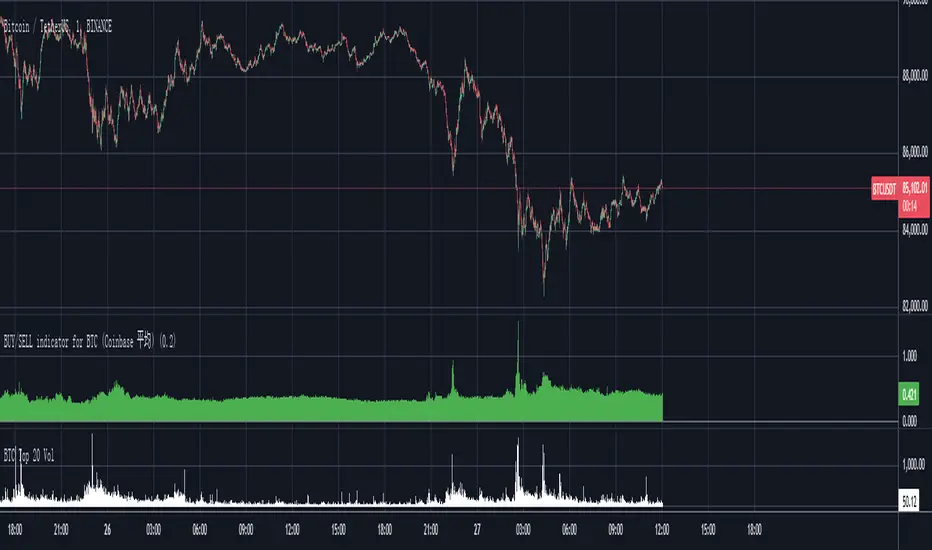
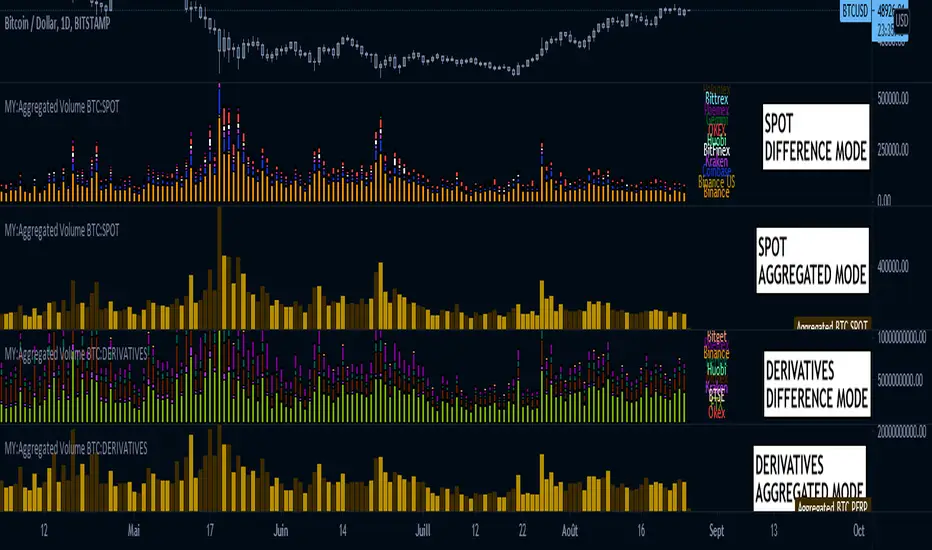
MY:Aggregated Volume BTC:DERIVATIVESโโMY Aggregated Volume BTC DERIVATIVES
This indicator shows a panel to display the Bitcoin Trading Volume of different exchanges. A lot of traders follow the default volume indicator provided by tradingview. This default indicator shows the volume for the current ticker (example BTCUSD:BITSTAMP), but each exchange has its own volume.
In a matter of visibility and accessibility, I've decided to aggregate the volume of almost all the Bitcoin exchanges (tickers) in tradingview.
This indicator helps identifying decreasing volume, where the volume comes from (spot or derivatives). A decreasing DERIVATIVES volume isn't a good sign as it shows a decrease in the buying pressure.
The panel has 1 main configuration : Display mode, showing Aggregated (all exchanges in one bar) or Difference (Stacked bar)
The other configuration Legend Item Gap and Legend X Gap is for when the difference mode is selected. It affects the position of the legend. Some might have smaller screens, bigger screens, viewport zoomed in etc.
Due to the number of exchanges, and pinescript limitations, I had to split the volume in 2 indicators, the SPOT volume, and the DERIVATIVES volume. The script in this page is specific to the DERIVATIVES volume. For the SPOT, please refer to my other available script.
Exchange list :
// OKEX:BTCUSDPERP
// OKEX:BTCUSDTPERP
// FTX:BTCPERP
// BTSE:BTCPFC
// KRAKEN:XBTUSDPERP
// BITMEX:XBTUSD
// HUOBI:BTCPERP
// DERIBIT:BTCPERP
// BINANCE:BTCPERP
// BINANCE:BTCUSDTPERP
// PHEMEX:BTCUSD
// BITGET:BTCUSDPERP
// BITGET:BTCUSDTPERP
MY:Aggregated Volume BTC:SPOTโโMY Aggregated Volume BTC SPOT
This indicator shows a panel to display the Bitcoin Trading Volume of different exchanges. A lot of traders follow the default volume indicator provided by tradingview. This default indicator shows the volume for the current ticker (example BTCUSD:BITSTAMP), but each exchange has its own volume.
In a matter of visibility and accessibility, I've decided to aggregate the volume of almost all the Bitcoin exchanges (tickers) in tradingview. Some have been commented out (Kucoin, FTX) due to high volume data which was hiding the other ones.
This indicator helps identifying decreasing volume, where the volume comes from (spot or derivatives). A decreasing SPOT volume isn't a good sign as it shows a decrease in the buying pressure.
The panel has 1 main configuration : Display mode, showing Aggregated (all exchanges in one bar) or Difference (Stacked bar)
The other configuration Legend Item Gap and Legend X Gap is for when the difference mode is selected. It affects the position of the legend. Some might have smaller screens, bigger screens, viewport zoomed in etc.
Due to the number of exchanges, and pinescript limitations, I had to split the volume in 2 indicators, the SPOT volume, and the DERIVATIVES volume. The script in this page is specific to the SPOT volume. For the DERIVATIVES, please refer to my other available script.
Exchange list :
// BINANCE:BTCUSD
// BINANCE:BTCUSDT
// BINANCE:BTCEUR
// COINBASE:BTCUSD
// COINBASE:BTCUSDT
// COINBASE:BTCEUR
// KRAKEN:XBTUSD
// KRAKEN:XBTUSDT
// KRAKEN:XBTEUR
// BITFINEX:BTCUSD
// BITFINEX:BTCEUR
// HUOBI:BTCUSDT
// HUOBI:BTCUSDC
// OKEX:BTCUSDT
// FTX:BTCUSD DISABLED FOR NOW, TO MUCH VOLUME
// FTX:BTCUSDT DISABLED FOR NOW, TO MUCH VOLUME
// KUCOIN:BTCUSDT DISABLED FOR NOW, TO MUCH VOLUME
// KUCOIN:BTCUSDC DISABLED FOR NOW, TO MUCH VOLUME
// GEMINI:BTCUSD
// GEMINI:BTCEUR
// PHEMEX:BTCUSDT
// BITTREX:BTCUSD
// BITTREX:BTCUSDT
// BITTREX:BTCEUR
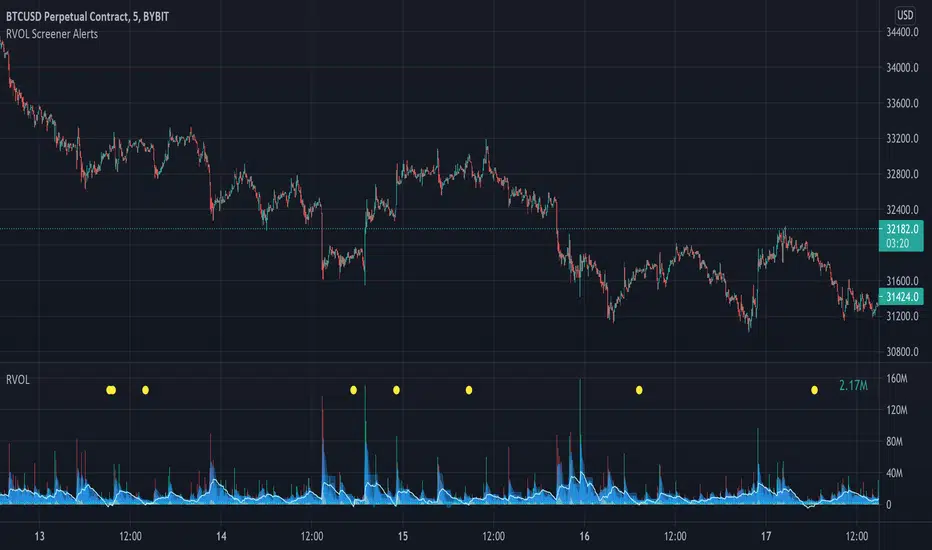
Relative Volume Screener AlertsThis script will screen 12 different stocks and current chart (13 in total) for entry points from my relative volume indicator.
1. Enter in any ticker ID's from charts you wish to scan in the settings.
2. Go to desired timeframe.
3. Click add alert button at top toolbar.
4. Select RVOL Screener Alerts indicator, input alert notification settings and/or change alert name and click create.
The script will then scan the stocks and alert you of any entry points from the timeframe you set the alerts.
A new alert needs to be created for each timeframe you wish to screen.
You can find my relative volume indicator here:
RSI Support & Resistance by DGTRSI Sแดแดแดแดสแด & Rแด๊ฑษช๊ฑแดแดษดแดแด สส DGT
This experimental study attempts to translate Relative Strength Index (RSI) threshold levels of oversold/overbought and bull/bear zones as probable Price Support and Resistance levels
โโ OPTIONS
Support & Resistance Levels , the main aim of the study. Level calculations are based on Relative Strength Index (RSI) threshold levels of oversold/overbought and bull/bear zones, where all threshold values are customizable through the user dialog box. Background of the levels can be colored optionally
RSI Weighted Colored Bars and/or Mark Overbought/Oversold Bars , Bar colors can be painted to better emphasis RSI values. Darker colors when the oscillator is in oversold/overbought zones, light colors when oscillator readings are below/above the bull/bear zone respectively, and remain unchanged otherwise. Besides the colors, with โDisplay RSI Overbought/Oversold Price Barsโ option little triangle shapes can be plotted on top or bottom of the bars when RSI is in oversold/overbought zones
Example usage of the study with explanations
โโ OTHERS
More regarding Support & Resistance concept (definition, identifying levels, trading S&R, etc) you are kindly invited to check my previous publication
Price Action - Support & Resistance by DGT
More regarding Relative Strength Index (RSI) and Relative Strength of Volume Indicators , please check Relative Strength of Volume Indicators by DGT
Disclaimer:
Trading success is all about following your trading strategy and the indicators should fit within your trading strategy, and not to be traded upon solely
The script is for informational and educational purposes only. Use of the script does not constitute professional and/or financial advice. You alone have the sole responsibility of evaluating the script output and risks associated with the use of the script. In exchange for using the script, you agree not to hold dgtrd TradingView user liable for any possible claim for damages arising from any decision you make based on use of the script
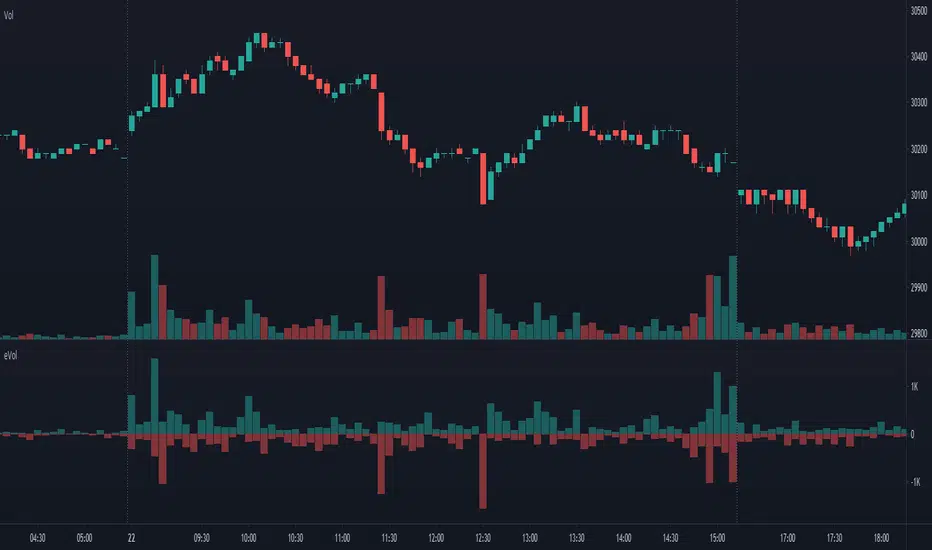
Estimated Up Down VolumeThis indicator plot estimated Up volume and Down volume.
Adjust colors to the default volume indicator.
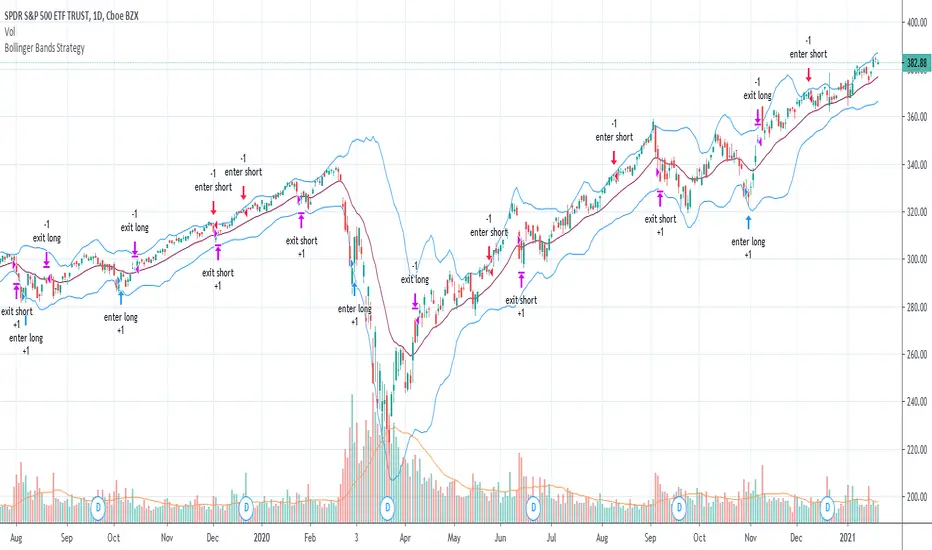
Bollinger Bands Strategy with Intraday Intensity IndexFor Educational Purposes. Results can differ on different markets and can fail at any time. Profit is not guaranteed.
This only works in a few markets and in certain situations. Changing the settings can give better or worse results for other markets.
This is a mean reversion strategy based on Bollinger Bands and the Intraday Intensity Index (a volume indicator). John Bollinger mentions that the Intraday Intensity Index can be used with Bollinger Bands and is one of the top indicators he recommends in his book. It seems he prefers it over the other volume indicators that he compares to for some reason. III looks a lot like Chaikin Money Flow but without the denominator in that calculation. On the default settings of the BBs, the III helps give off better entry signals. John Bollinger however is vague on how to use the BBs and it's hard to say if one should enter when it is below/above the bands or when the price crosses them. I find that with many indicators and strategies it's best to wait for a confirmation of some sort, in this case by waiting for some crossover of a band. Like most mean reversion strategies, the exit is very loose if using BBs alone. Usually the plan to exit is when the price finally reverts back to the mean or in this case the middle band. This can potentially lead to huge drawdowns and/or losses. Mean reversion strategies can have high win/loss ratios but can still end up unprofitable because of the huge losses that can occur. These drawdowns/losses that mean reversion strategies suffer from can potentially eat away at a large chunk of all that was previously made or perhaps up to all of it in the worst cases, can occur weeks or perhaps up to months after being profitable trading such a strategy, and will take a while and several trades to make it all back or keep a profitable track record. It is important to have a stop loss, trailing stop, or some sort of stop plan with these types of strategies. For this one, in addition to exiting the trade when price reverts to the middle band, I included a time-based stop plan that exits with a gain or with a loss to avoid potentially large losses, and to exit after only a few periods after taking the trade if in profit instead of waiting for the price to revert back to the mean.
Freedom of MovementFreedom of Movement Indicator
---------------------------------------------------------
In โEvidence-Based Support & Resistanceโ article, author Melvin Dickover introduces two new indicators to help traders note support and resistance areas by identifying supply and demand pools. Here you can find the support-resistance technical indicator called "Freedom of Movement".
The indicator takes into account price-volume behavior in order to detect points where movement of price is suddenly restricted, the possible supply and demand pools. These points are also marked by Defended Price Lines (DPLs).
DPLs are horizontal lines that run across the chart at levels defined by following conditions:
* Overlapping bars: If the indicator spike (i.e., indicator is above 2.0 or a custom value) corresponds to a price bar overlapping the previous one, the previous close can be used as the DPL value.
* Very large bars: If the indicator spike corresponds to a price bar of a large size, use its close price as the DPL value.
* Gapping bars: If the indicator spike corresponds to a price bar gapping from the previous bar, the DPL value will depend on the gap size. Small gaps can be ignored: the author suggests using the previous close as the DPL value. When the gap is big, the close of the latter bar is used instead.
* Clustering spikes: If the indicator spikes come in clusters, use the extreme close or open price of the bar corresponding to the last or next to last spike in cluster.
DPLs can be used as support and resistance levels. In order confirm and refine them, FoM (Freedom of Movement) is used along with the Relative Volume Indicator (RVI), which you can find here:
Clustering spikes provide the strongest DPLs while isolated spikes can be used to confirm and refine those provided by the RVI. Coincidence of spikes of the two indicator can be considered a sign of greater strength of the DPL.
More info:
S&C magazine, April 2014.
Dynamic Money Flow with color switch [aamonkey]"Dynamic Money Flow is a volume indicator based on Marc Chaikin's Money Flow with a few improvements.
It can be used to confirm break-outs and trends." (RezzaHmt)
This is the script from RezzaHmt called "Dynamic Money Flow".
All I did is the color change of the line because I find it easier to read that way.
Here you can find the original script explaining the theory behind this indicator:
R100 Wave v2 (*v*)This is a Wave (or Zig Zag) indicator I made to use in conjunction with the Wave Volume indicator I use.
It uses the Jurik moving average to determine turning points, and will plot the tops and bottoms of the wave based on the most recent high- so you can also use to quickly find pivot highs and lows. If you are using with the R100 Wave Volume indicator, first adjust the wave to fit better (if required) using the Jurik length and/or power, and then use the same settings on the Wave Volume indicator. Default settings work pretty well for most stocks, but adjusting the length between 8 and 14 should be enough for a good fit, or adjust the power between 1 and 3, or get fussy and tweak it with both.
The Jurik MA has been modified to include a VWAP component, so will only work where you have volume. The last "leg" of the wave will move about until the next pivot high or low is found and then will remain fixed.
I hope you find some value with it. Only conditions of use are that if you improve it, let me know and if you publish something that uses it, don't hide the code! Enjoy!
Code pinched and modified from Zero Lag ZigZag by Duyck - thankyou
Jurik Moving Average (for turning points) by Everget - thankyou
and Weis Wave by Modhelius - thankyou
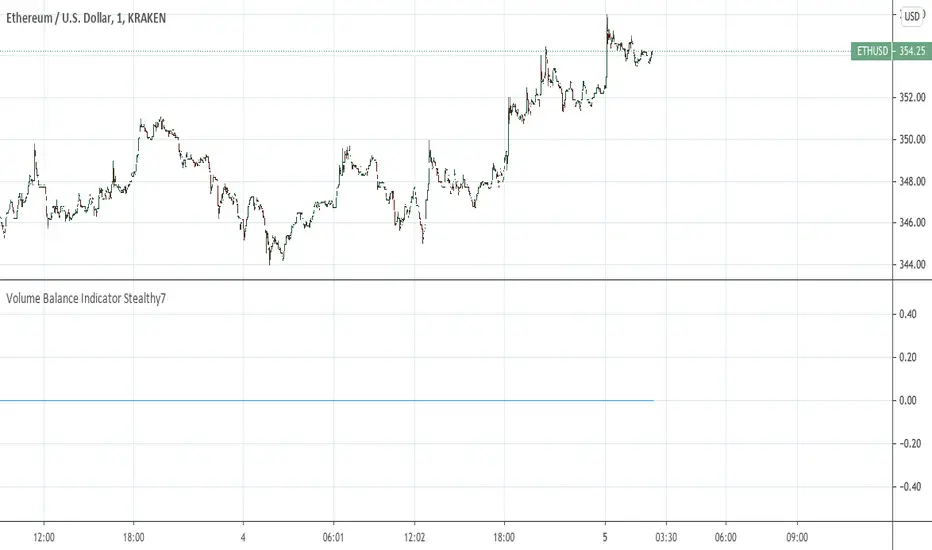
Volume Balance Indicator Stealthy7Find out if Bulls (buys) or Bears (sells) are moving the price. This gives a clear view of activity, even if you are using a higher time period. The lookback is in minutes, I believe. This is a superior volume indicator. Bars are recolored to show the underlying activity per the look back (minutes).
Normalized VolumeA simple study of normalized volume. Normalizing the volume can sometimes make it easier to see when it is above average. Normalizing volume in this way portrays the total volume as a percentage above or below the moving average chosen. By this method, its output number is the percentage above 100% or below 100% (ie. a value of 110 really means the day's volume is 10% greater than the moving average.)
I have also included a monochrome option, that I prefer on my charts as well as a rising/falling (1 period) indication on the moving average, which I have defaulted to 9 periods (fully customizable).
For me, displaying the moving average rising/falling makes sense as oftentimes when the volume flow changes direction, it heralds an end or pause in the move.
The default settings are for normalization off, and monochromatic display. Check their respective boxes for your preferred view.
I sincerely hopes this helps any fans of volume indicators.
And as always, trade responsibly, I am not responsible for gains/losses incurred and make no claim to authorship of this idea.
Good Trading folks, enjoy.
Shiroki
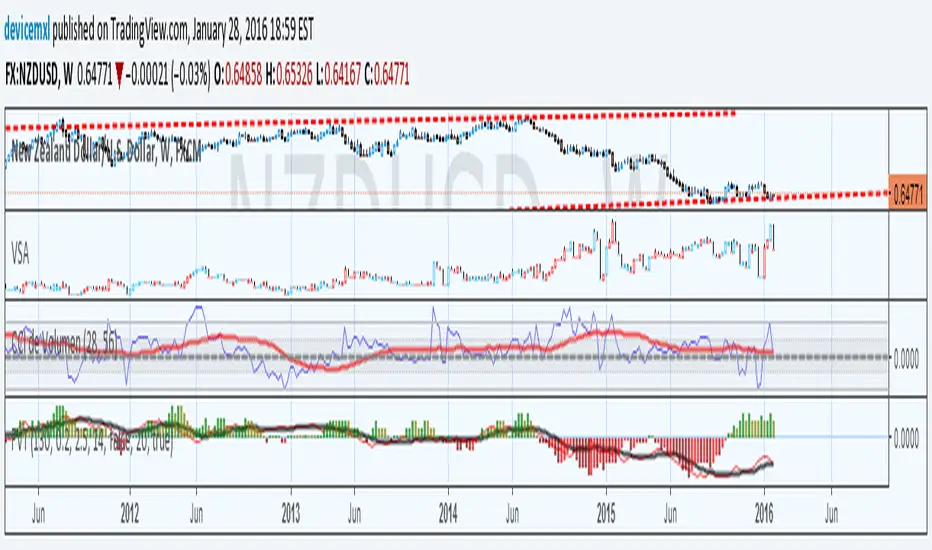
Propagation Volumes and TrendsWith this, i calculate RSI of the HL2 of the volume and use like an oscillator, this will use to measure the strength of the trend and the "Volume Flow" to follow the trend.
I use like foundation the LazyBear "Volume Flow Indicator" "honor a quien honor merece"
Background:
I think the volume as the price could be represented by candles or other graphic to use indicators and strengthen their analysis, due to lack of registration of this it is first necessary to calculate a volume graph, if the candle traditionally negative price brand then the total volume is taken as negative for the period. An example of this is in the On Balance Volume indicator, the problem is that there is no way to analyze the volume using other methods. An approximate volume of the spread could be the use of the price spread to make a synthetic behavior
As traditionally is observed if Open> Close then the candle and the volume will be negative and vice versa; the next step, is estimate the amounts of the candle necessary to calculate the ratio to use for the volume and thus idealize their spread within the candle:
VLOW = Volume x Low
vHigh = x High Volume
VOpen = vClose
vClose = Volume x Close
This graph can show a stable synthetic form of fluctuations in the volume trend affected by price.
ideas, comments and suggestions (or corrections).They are always welcome
Teemo Volume Delta & Market HUDTeemo Volume Delta & Market HUD
Description:
Teemo Volume Delta goes beyond simple volume indicators to provide expert-level analysis of Buy and Sell pressure within the market. It visualizes supply/demand imbalances inside candles and provides an immediate grasp of market control via a real-time HUD.
With the v1.2.0 update, we have removed unnecessary overlays (like EMAs) to focus on Pure Delta Analysis and a flexible Smart Accumulation System, making the tool lighter and more powerful.
๐ Key Features
1. Dual Calculation Modes Offers two calculation methods tailored to your trading environment and goals:
Estimation: Rapidly estimates buy/sell volume based on candle shape (OHLC) and price range. It features fast loading times and works instantly on all assets.
Intraday: Analyzes lower timeframe data (e.g., 1-minute bars) to calculate the precise delta of the current timeframe. (Loading time may vary depending on TradingView data limits.)
2. Smart Accumulation System Supports strategic analysis beyond simple summation with two distinct modes:
Time Based: Resets the Cumulative Delta to 0 at specific intervals (e.g., every 4 hours, Daily). This is optimized for session-based analysis or day trading.
Infinite: Continuously accumulates data without resetting, ideal for analyzing long-term Divergences between price and delta.
3. Intuitive HUD (Heads-Up Display) Displays critical market data on the chart for instant decision-making:
Delta Panel: Shows real-time Buy/Sell volume and Net Delta for the current candle.
Market HUD: Provides a comprehensive view of Trend Strength (ADX), Momentum (RSI), and the Cumulative Buy/Sell status for the current period.
4. Teemo Design System (v1.2) Provides optimized color themes for visual comfort during long trading sessions:
Teemo Neon: High-contrast Mint/Purple theme optimized for dark backgrounds.
Classic Soft: A calming Soft Green/Red theme designed to reduce eye strain (Recommended for all backgrounds).
โ๏ธ Settings Guide
Calculation Mode: Choose between Estimation (Speed) or Intraday (Precision).
Accumulation Mode: Choose Time Based (Periodic Reset) or Infinite (Continuous).
Reset Period: Set the reset interval for Time Based mode (e.g., 1D = Daily Reset).
Color Preset: Select between Teemo Neon or Classic Soft themes.
๐ก Trading Tips
Delta Divergence: If the price makes a higher high but the Cumulative Delta (HUD) makes a lower high, it signals weakening buying pressure and a potential reversal.
Candle Coloring: A solid Mint (or Green) candle body indicates a price rise accompanied by strong actual buying volume, offering higher reliability than standard candles.
HUD Confluence: Consider trend-following entries when the ADX is above 25 and the Delta is heavily skewed in one direction.
This indicator is for informational purposes only and does not constitute financial advice. The Estimation mode provides approximations based on algorithms, and the Intraday mode's accuracy depends on the quality of the lower timeframe data provided by the exchange.
Developed by Teemo Trading Systems
------------------------------------------------------------------------
Teemo Volume Delta & Market HUD
์ค๋ช
๋ณธ๋ฌธ:
Teemo Volume Delta๋ ๋จ์ํ ๊ฑฐ๋๋ ์งํ๋ฅผ ๋์ด, ์์ฅ ๋ด๋ถ์ ๋งค์(Buy)์ ๋งค๋(Sell) ์๋ ฅ์ ์ ๋ฐํ๊ฒ ๋ถ์ํ๋ ์ ๋ฌธ๊ฐ์ฉ ๋๊ตฌ์
๋๋ค. ์บ๋ค ๋ด๋ถ์ ์๊ธ ๋ถ๊ท ํ์ ์๊ฐํํ๊ณ , ์ค์๊ฐ HUD๋ฅผ ํตํด ์์ฅ์ ์ฃผ๋๊ถ์ด ๋๊ตฌ์๊ฒ ์๋์ง ์ฆ๊ฐ์ ์ผ๋ก ํ์
ํ ์ ์๋๋ก ๋์ต๋๋ค.
v1.2.0 ์
๋ฐ์ดํธ๋ฅผ ํตํด ๋ถํ์ํ ๋ณด์กฐ์งํ(EMA)๋ฅผ ์ ๊ฑฐํ๊ณ , ์์ํ ๋ธํ ๋ถ์๊ณผ ์ ์ฐํ ๋์ (Accumulation) ์์คํ
์ ์ง์คํ์ฌ ๋์ฑ ๊ฐ๋ณ๊ณ ๊ฐ๋ ฅํด์ก์ต๋๋ค.
๐ ์ฃผ์ ๊ธฐ๋ฅ (Key Features)
1. ๋์ผ ๊ณ์ฐ ๋ชจ๋ (Dual Calculation Modes) ์ฌ์ฉ์์ ํ๊ฒฝ๊ณผ ๋ชฉ์ ์ ๋ง์ถฐ ๋ ๊ฐ์ง ๊ณ์ฐ ๋ฐฉ์์ ์ ๊ณตํฉ๋๋ค.
Estimation (์ถ์ ๋ชจ๋): ์บ๋ค์ ํํ(OHLC)์ ๊ฐ๊ฒฉ ๋ณ๋ํญ์ ๊ธฐ๋ฐ์ผ๋ก ๋งค์/๋งค๋ ๋ณผ๋ฅจ์ ๋น ๋ฅด๊ฒ ์ถ์ ํฉ๋๋ค. ๋ก๋ฉ ์๋๊ฐ ๋น ๋ฅด๋ฉฐ ๋ชจ๋ ์์ฐ์ ์ฆ์ ์ ์ฉ ๊ฐ๋ฅํฉ๋๋ค.
Intraday (์ ๋ฐ ๋ถ์ ๋ชจ๋): ํ์ ํ์ํ๋ ์(์: 1๋ถ๋ด)์ ๋ฐ์ดํฐ๋ฅผ ๋ถ์ํ์ฌ ์์ ํ์ํ๋ ์์ ๋ธํ๋ฅผ ์ ๋ฐํ๊ฒ ๊ณ์ฐํฉ๋๋ค. (TradingView ๋ฐ์ดํฐ ์ ํ์ ๋ฐ๋ผ ๋ก๋ฉ ์๊ฐ์ด ์์๋ ์ ์์ต๋๋ค.)
2. ์ค๋งํธ ๋์ ์์คํ
(Smart Accumulation) ๋จ์ ๋์ ์ ๋์ด, ์ ๋ต์ ๋ถ์์ ์ํ ๋ ๊ฐ์ง ๋ชจ๋๋ฅผ ์ง์ํฉ๋๋ค.
Time Based: ์ง์ ํ ์ฃผ๊ธฐ(์: 4์๊ฐ, 1์ผ)๋ง๋ค ๋์ ๋ธํ๋ฅผ **0์ผ๋ก ์ด๊ธฐํ(Reset)**ํฉ๋๋ค. ์ธ์
๋ณ ์๊ธ ๋ถ์์ด๋ ๋ฐ์ด ํธ๋ ์ด๋ฉ์ ์ต์ ํ๋์ด ์์ต๋๋ค.
Infinite: ์ด๊ธฐํ ์์ด ๋ฐ์ดํฐ๋ฅผ ๊ณ์ ๋์ ํ์ฌ, ์ฅ๊ธฐ์ ์ธ ๊ฐ๊ฒฉ๊ณผ ๋ธํ์ **๋ค์ด๋ฒ์ ์ค(Divergence)**๋ฅผ ๋ถ์ํ๋ ๋ฐ ์ ์ฉํฉ๋๋ค.
3. ์ง๊ด์ ์ธ HUD (Heads-Up Display) ์ฐจํธ ์ฐ์ธก๊ณผ ์ข์ธก์ ํต์ฌ ์ ๋ณด๋ฅผ ์์ฝํ์ฌ ๋ณด์ฌ์ค๋๋ค.
Delta Panel: ํ์ฌ ์บ๋ค์ ๋งค์/๋งค๋ ๊ฑฐ๋๋๊ณผ ์๋งค์(Net Delta) ์ํ๋ฅผ ์ค์๊ฐ์ผ๋ก ํ์ํฉ๋๋ค.
Market HUD: ADX(์ถ์ธ ๊ฐ๋), RSI(๋ชจ๋ฉํ
), ๊ทธ๋ฆฌ๊ณ ํ์ฌ ๊ตฌ๊ฐ์ ๋์ ๋งค์/๋งค๋ ํํฉ์ ํ๋์ ๋ณผ ์ ์์ต๋๋ค.
4. Teemo Design System (v1.2) ์ฅ์๊ฐ ์ฐจํธ๋ฅผ ๋ณด๋ ํธ๋ ์ด๋๋ฅผ ์ํด ์์ธ์ฑ์ด ๋ฐ์ด๋ ์ปฌ๋ฌ ํ
๋ง๋ฅผ ์ ๊ณตํฉ๋๋ค.
Teemo Neon: ์ด๋์ด ๋ฐฐ๊ฒฝ์ ์ต์ ํ๋ ๊ณ ๋๋น ๋ฏผํธ/ํผํ ํ
๋ง.
Classic Soft: ๋์ ํผ๋ก๋ฅผ ์ค์ฌ์ฃผ๋ ์ฐจ๋ถํ ๊ทธ๋ฆฐ/๋ ๋ ํ
๋ง (๋ฐ์/์ด๋์ด ๋ฐฐ๊ฒฝ ๋ชจ๋ ์ถ์ฒ).
โ๏ธ ์ค์ ๊ฐ์ด๋ (Settings)
Calculation Mode: Estimation(์๋ ์ค์ฌ) ๋๋ Intraday(์ ํ๋ ์ค์ฌ) ์ค ์ ํ.
Accumulation Mode: Time Based(์ฃผ๊ธฐ๋ณ ๋ฆฌ์
) ๋๋ Infinite(๋ฌดํ ๋์ ) ์ ํ.
Reset Period: Time Based ๋ชจ๋ ์ฌ์ฉ ์ ๋ฆฌ์
ํ ์ฃผ๊ธฐ ์ค์ (์: 1D = ๋งค์ผ ๋ฆฌ์
).
Color Preset: Teemo Neon ๋๋ Classic Soft ํ
๋ง ์ ํ.
๐ก ํ์ฉ ํ (Trading Tips)
๋ธํ ๋ค์ด๋ฒ์ ์ค: ๊ฐ๊ฒฉ์ ์ ๊ณ ๊ฐ๋ฅผ ๊ฐฑ์ ํ์ง๋ง ๋์ ๋ธํ(Cum Delta)๋ ๋ฎ์์ง๋ค๋ฉด, ๋งค์์ธ๊ฐ ์ฝํ๋๊ณ ์๋ค๋ ๊ฐ๋ ฅํ ๋ฐ์ ์ ํธ์
๋๋ค.
์บ๋ค ์ปฌ๋ฌ๋ง: ์บ๋ค์ ๋ชธํต ์์์ด ์ง์ ๋ฏผํธ์(๋๋ ๊ทธ๋ฆฐ)์ด๋ผ๋ฉด ๊ฐ๋ ฅํ ๋งค์์ธ๊ฐ ๋๋ฐ๋ ์์น์ ์๋ฏธํ๋ฉฐ, ์ ๋ขฐ๋๊ฐ ๋์ต๋๋ค.
HUD ํ์ฉ: ADX๊ฐ 25 ์ด์์ด๋ฉด์ ๋ธํ๊ฐ ํ์ชฝ ๋ฐฉํฅ์ผ๋ก ์ ๋ฆด ๋ ์ถ์ธ ๋งค๋งค๋ฅผ ๊ณ ๋ คํ์ธ์.
์ด ์งํ๋ ์ ๋ณด ์ ๊ณต์ ๋ชฉ์ ์ผ๋ก๋ง ์ฌ์ฉ๋๋ฉฐ, ์ฌ์ ์ ์กฐ์ธ์ด ์๋๋๋ค. Estimation ๋ชจ๋๋ ๊ทผ์ฌ์น๋ฅผ ์ ๊ณตํ๋ฉฐ, Intraday ๋ชจ๋๋ ๊ฑฐ๋์์์ ์ ๊ณตํ๋ ํ์ ๋ฐ์ดํฐ์ ํ์ง์ ๋ฐ๋ผ ์ ํ๋๊ฐ ๋ฌ๋ผ์ง ์ ์์ต๋๋ค.
Momentum by Trading BiZonesSqueeze Momentum Indicator with EMA
Overview
The Squeeze Momentum Indicator with EMA is a powerful technical analysis tool that combines the original Squeeze Momentum concept with an Exponential Moving Average (EMA) overlay. This enhanced version helps traders identify market momentum, volatility contractions (squeezes), and potential trend reversals with greater precision.
Core Concept
The indicator operates on the principle of volatility contraction and expansion:
Squeeze Phase: When Bollinger Bands move inside the Keltner Channel, indicating low volatility and potential energy buildup
Expansion Phase: When momentum breaks out of the squeeze, signaling potential directional moves
Key Components
1. Squeeze Momentum Calculation
Formula: Momentum = Linear Regression(Close - Average Price)
Where Average Price = (Highest High + Lowest Low + SMA(Close)) / 3
Visualization: Histogram bars showing positive (green) and negative (red) momentum
Zero Line: Represents equilibrium point between buyers and sellers
2. EMA Overlay
Purpose: Smooths momentum values to identify underlying trends
Customization:
Adjustable period (default: 20)
Toggle on/off display
Customizable color and line thickness
Cross Signals: Buy/sell signals when momentum crosses above/below EMA
3. Volatility Bands
Bollinger Bands (20-period, 2 standard deviations)
Keltner Channels (20-period, 1.5 ATR multiplier)
Squeeze Detection: Visual background shading when BB are inside KC
Trading Signals
Buy Signals (Green Upward Triangle)
Momentum histogram crosses ABOVE EMA line
Occurs during or after squeeze release
Confirmed by expanding histogram bars
Sell Signals (Red Downward Triangle)
Momentum histogram crosses BELOW EMA line
Often precedes market downturns
Watch for increasing negative momentum
Squeeze Warnings (Gray Background)
Market in low volatility state
Prepare for potential breakout
Direction indicated by momentum bias
Indicator Settings
Main Parameters
Length: Period for calculations (default: 20)
Show EMA: Toggle EMA visibility
EMA Period: Smoothing period for EMA
Visual Settings
Histogram color-coding based on momentum direction
EMA line color and thickness
Signal marker size and visibility
Squeeze zone background display
Practical Applications
Trend Identification
Uptrend: Consistently positive momentum with EMA support
Downtrend: Consistently negative momentum with EMA resistance
Range-bound: Oscillating around zero line
Entry/Exit Points
Conservative Entry: Wait for squeeze release + EMA crossover
Aggressive Entry: Anticipate breakout during squeeze
Exit: Opposite crossover or momentum divergence
Risk Management
Use squeeze zones as warning periods
EMA crossovers as confirmation signals
Combine with support/resistance levels
Advanced Interpretation
Momentum Strength
Strong Bullish: Tall green bars above EMA
Weak Bullish: Short green bars near EMA
Strong Bearish: Tall red bars below EMA
Weak Bearish: Short red bars near EMA
Divergence Detection
Price makes higher high, momentum makes lower high โ Bearish divergence
Price makes lower low, momentum makes higher low โ Bullish divergence
Squeeze Characteristics
Long squeezes: More potential energy
Frequent squeezes: Choppy market conditions
No squeezes: High volatility, trending markets
Recommended Timeframes
Scalping: 1-15 minute charts
Day Trading: 15-minute to 4-hour charts
Swing Trading: 4-hour to daily charts
Position Trading: Daily to weekly charts
Best Practices
Confirmation
Use with volume indicators
Check higher timeframe direction
Wait for candle close confirmation
Filtering Signals
Ignore signals during extreme volatility
Require minimum bar size for crossovers
Consider market context (news, sessions)
Combination Suggestions
With RSI: Confirm overbought/oversold conditions
With Volume Profile: Identify high-volume nodes
With Support/Resistance: Key level reactions
With Trend Lines: Breakout confirmations
Limitations
Lagging indicator (based on past data)
Works best in trending markets
May give false signals in ranging markets
Requires proper risk management
Conclusion
The Squeeze Momentum Indicator with EMA provides a comprehensive view of market dynamics by combining volatility analysis, momentum measurement, and trend smoothing. Its visual clarity and customizable parameters make it suitable for traders of all experience levels seeking to identify high-probability trading opportunities during volatility contractions and expansions.